Impacted Members/Scientists: Request a membership waiver, seek meeting support, and other resources. Learn more. For the latest public policy updates, please visit this page.




28 October 2025
Interactive Live Scripts for Astronomy and Physics Education
Duncan Carlsmith
University of Wisconsin–Madison
Welcome to the AAS Education Committee Blog! Our blog features posts from astronomers and educators in the extended AAS community, curated by the AAS Education Committee. Subscribe here to receive future posts and other astronomy education news directly into your inbox every two weeks; also follow us on Bluesky and Instagram. We welcome guest article submissions! — AAS Education Committee.
Empowering astronomy and physics students with professional-level computation in a first-year university introductory physics course can jump-start their active participation in research. I describe here illustrative open-source interactive Live Scripts available at the MathWorks File Exchange. Many have been used in a traditional context (lecture/demo, lab, discussion, comprehensive textbook) and others as seeds for directed study. Entering STEM-curious students generally have no prior experience with coding or with mathematics beyond a semester of calculus. No problem. They can learn by doing. Times change. Teaching should change, too.
MATLAB Interactive Live Scripts are documents mixing code, rendered LaTeX math, hypertext, visualizations, audio, and even interactive control widgets and hidden tasks.
Live Scripts can access remote online data archives via URL, APIs, and other means, and of course import a user’s local text, Excel, audio, image, video, and other data types. And MATLAB can run Python code. A Live Script can absorb a student’s voice memo of a woodpecker drumming and create and display a spectrogram with a few lines of code, and then they can look for patterns. (e.g., Woodpecker Drumming Explorer.) The student might wonder whether the drumming pattern is species-specific and go to a bird song archive to investigate. They might eventually use those same tools to tackle gravitational wave signals. Or a student might design, train, and operate a neural network based on their own audio recordings (e.g., Identify Objects Acoustically with a Neural Network), apply the techniques to identify tick species in their own mobile phone images, and then tackle consumer images at a national scale.[1] They could then apply such techniques to plate-solving and galaxy image classification.
I create Live Scripts that briefly explain what each function does and often include a hyperlink to the documentation for further explanation. ‘Try this’ suggestions with sliders to change parameter values and operational modes enable rapid exploration with the code exposed, not invisible behind some GUI. ‘Challenges’ suggest extensions or modifications to the code for further exploration. Hyperlinked journal references are portals to additional information. The File Exchange facilitates distribution: one click in a Canvas quiz takes the student to the Live Script landing page. This page provides an introduction, preview (Click the Examples tab), and a 1-click download or upload to the cloud.
Media-rich Canvas quizzes can be embedded with background information and hyperlinks to journal articles with auto-graded questions that students answered throughout using the Live Script. For example, for the recent script Skyfield Night Sky Explorer, a simple reading comprehension question might probe the student's understanding of the relevant material: “The provided file “de421.bsp” contains A) a correlation table of Hipparcos IDs and common names, B) a compact set of Chebyshev coefficients describing planetary orbits, C) a Python library, D) the Hipparcos catalog.” Instructors can provide framing questions that depend upon the context, interests, and the student’s background. For these reasons, I do not generally embed such content-focused questions in the Live Script, though I occasionally include a limited number of questions to collect data on student performance as a means to improve the Live Script documentation and quiz background information.
To assess the student’s ability to do something evaluative with the data, I suggest instructors assign results submission questions that might require the upload of a visualization, which can be rapidly human-graded with a clickable electronic rubric. For the Skyfield Night Sky Explorer example, I might ask, “Upload a simulated annotated mobile phone image in JPEG format centered on Vega as seen from Green Bay, WI, on Thanksgiving 2025, UTC 20:00:00. If Vega is below the horizon, disable horizon filtering.” A results submission question assessing the ability to visualize and communicate data might be “Upload a PDF of a histogram of Hipparcos star visual magnitude,” with a rubric entry like “Axes of the scatter plot are labelled appropriately.” Such rubrics should be visible to students in advance to ensure objectivity in assessment and reduce student stress.
A results submission question testing ability to handle minor coding challenges and to understand the provided code well enough to augment it might be “Upload a mobile phone image with the default location and camera orientation with stars color-coded by B-V index.” This task would require finding and using the B-V variable and experimenting with setting the colors of certain pixels in an image.
So what can you do with Live Script technology?
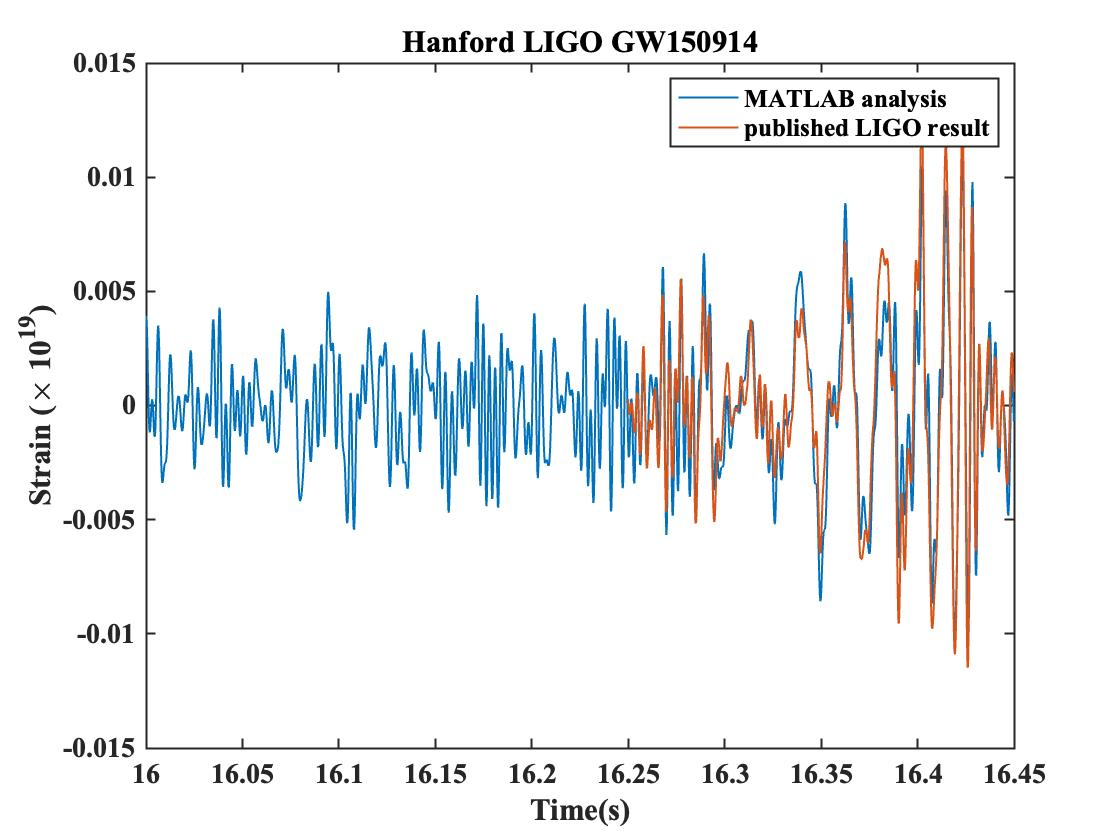
Gravitational Wave Data Explorer shows how, with a few lines of MATLAB code, one can reproduce from raw LIGO data the chirp signal that led to a Nobel Prize in Physics. (This code is featured in the LIGO-Virgo documentation and was adopted by MathWorks in a worked example.) Students are exposed to periodograms, spectrograms, digital filters, autocorrelation, and visualization techniques. Importantly, they view the raw data and get a sense of context and process. The quiz provides background information on black holes. The signal analysis extends their prior analyses of audio data, e.g., recordings of spark trains in canonical measurement of ‘g’ and of woodpecker drumming. This example illustrates my approach to advanced mathematics, such as Fourier analysis or autocorrelation: describe it in a few words and use it in a professional context. Move it from the unknown unknown to the known unknown. The student can study it elsewhere later and be motivated to advance in mathematics.
Asteroid Shape Data Explorer downloads public NASA surface models derived from various observations and explores methods for triangulating and visualizing surfaces. It computes the asymmetric exterior gravitational field, which could be used to compute the angle of repose and predict avalanches (observed) or to design asteroid probe orbits. The context is a Canvas quiz on asteroids and impact risk. The script provides practical skills, such as how to create an STL file and possibly 3D print a pet asteroid. As a warm-up to this script, students analyze rotation rate data that distinguishes rocky from icy asteroids. (Ice balls fly apart if they spin too fast. Rocks can spin faster.)
GAIA Data Explorer illustrates how to use the Gaia Archive's web service API and ADQL (Astronomical Data Query Language) and how to identify the Pleiades star cluster using classical clustering algorithms. This script is one of a series on named stars, asterisms, and standard near-star catalogs, with exemplary analyses such as the derivation of the period of a variable star from asynchronous (largely amateur) variable-star observations via a Lomb-Scargle periodogram.
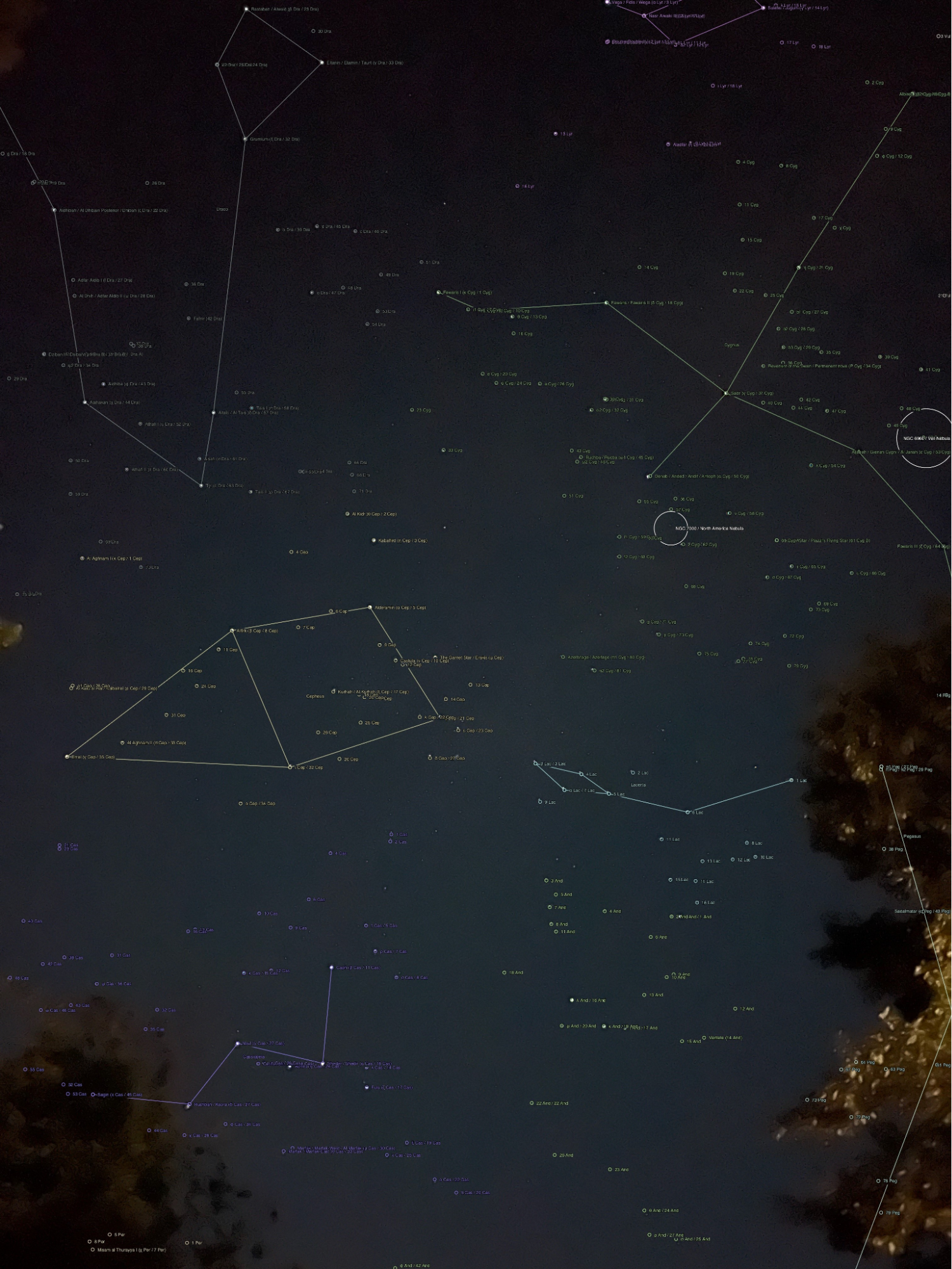
Several scripts are dedicated to using a mobile phone camera to learn about optics and image formation technology. Students can use a mobile phone camera to measure ‘g’ via the Doppler effect by dropping their phone, to discover and investigate dappled light, to calibrate a camera including nonlinearities using reference objects or stars, and to identify stars in a night sky image (as shown in the Mobile Phone Explorer example above) with astrometry.net web service, and then use voice assistive services and text-to-speech to programmatically control mobile phone night sky image collection. (Rest your phone on a table, launch a script on your laptop, and wake up in the morning with a pile of images to analyze, register, etc.) They can scan found objects like a wineglass with their phone camera, create a precise surface model via photogrammetry, import the surface, create a solid model, perform a finite element modal analysis, and mock up the sound it makes, and then change the object from say glass to brass, all in one Live Script (Singing Wine Glass and Bowl Explorer).
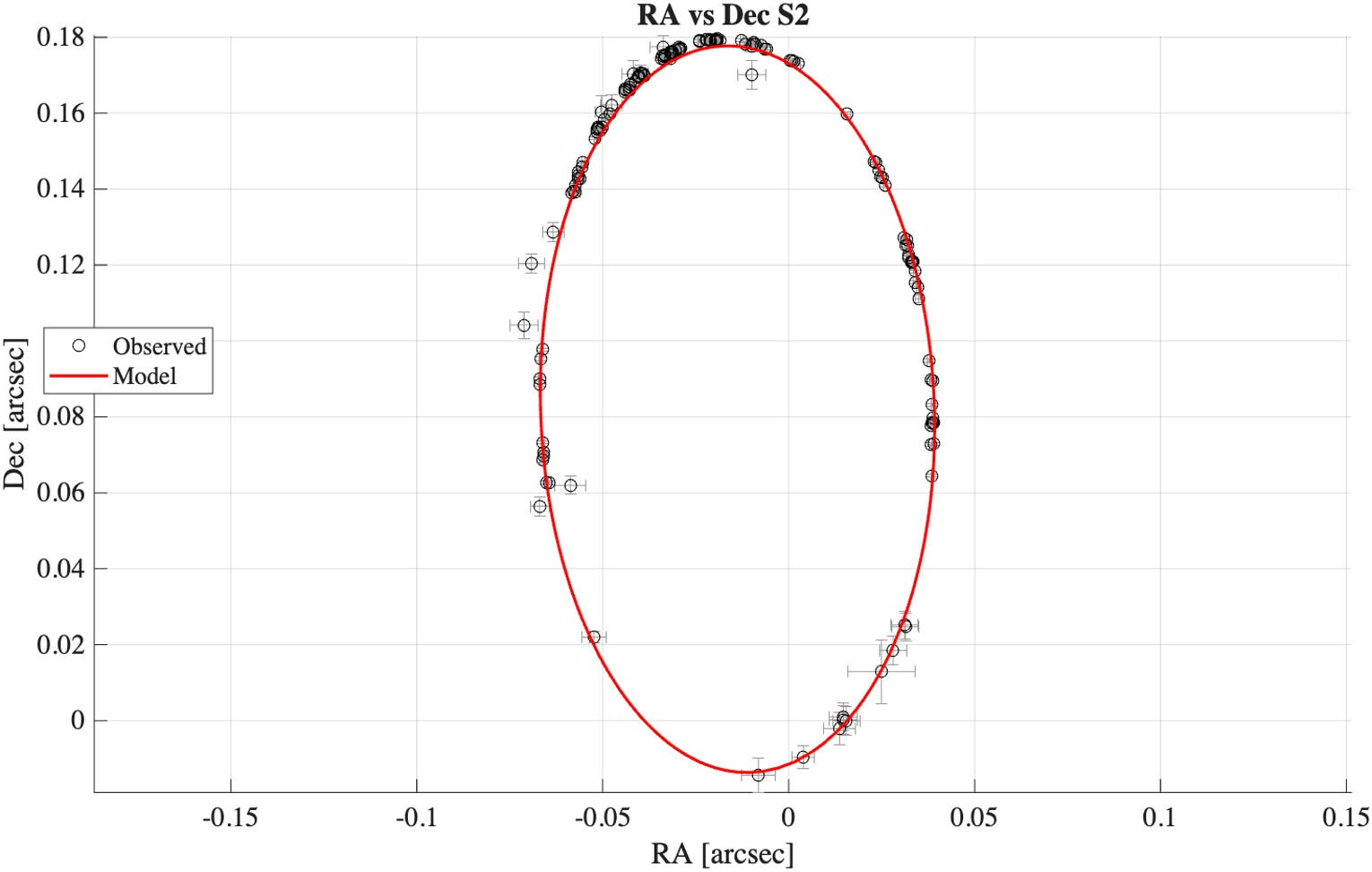
Other products (not inclusive) of possible interest are: Infrared Science Archive Explorer, A Live Script exploring IRSA astronomy images via API, SgrA Black Hole Stellar Orbit Explorer, A Live Script illustrating fits to observations of stars orbiting the black hole in the center of the Milky Way, Markov Chain Monte Carlo Stellar Orbit Fit Explorer, Live Script exploring Markov chain Monte Carlo fits to observations of stars orbiting a black hole, and Exoplanet Transit Explorer, Explores original transit signal evidence for seven Earth-sized exoplanets planets in the Trappist-1 system.
Disclosure: The author has no financial or other interest in MathWorks.
[1] Justen, L., Carlsmith, D., Paskewitz, S. M., Bartholomay, L. C., & Bron, G. M. (2021). Identification of public submitted tick images: a neural network approach. Plos one, 16(12), e0260622.